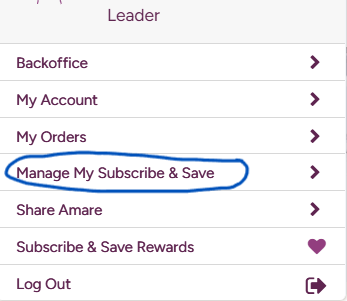
Step 5: Check Your Subscribe & Save
1. Log into Your Amare Account
On desktop: hover over your name in the top-right, then select “Manage My Subscribe & Save” from the dropdown.
On mobile: tap the person/user icon and choose “Subscribe & Save Rewards” or “Manage My Subscribe & Save.”
2. View Your Active Subscribe & Save Orders
Once on the management page, you’ll see your recurring orders listed.
To review or modify any order, click “Edit.”
3. Edit Order Details
You can make the following changes to your Subscribe & Save:
Modify products: Remove existing items or add new ones.
Change delivery schedule: Select your preferred frequency—typically every 30, 60, or 90 days.
Adjust ship date: Pick when your next order will process.
4. Create a New Subscribe & Save Order (if needed)
Go to “Manage My Subscribe & Save”
Click “Create a New Subscribe and Save Order”
Use the “Build” option to choose your products (including bundle options like Bundle & Save).